Shark Robot Vacuum Brush Not Spinning: The Definitive Repair Guide
Estimated reading time: 12 minutes.
- Power Cycle: Flip the physical power switch on the side of the unit to “Off,” wait 30 seconds, and toggle it back to “On.”
- Obstruction Scan: Manually rotate the brush roll with your fingers. If it feels gritty or stuck, hair or debris is physically binding the motor shaft.
- Battery Health: Ensure the unit is fully charged. A low-voltage battery often disables high-draw components like the brush motor to preserve navigation power.
- App Status: Check the SharkClean app for specific error codes. If the app reports a “Brushroll Error,” the issue is likely electrical or mechanical, not software-based.
Table of Contents
- Root Causes: Why the Brush Roll Fails
- Step-by-Step Troubleshooting
- Recommended Video Fix
- Frequently Asked Questions
You bought a Shark robot vacuum to save time, not to spend your Saturday afternoon crawling on the floor with a pair of tweezers. When your Shark robot vacuum brush not spinning, the device effectively becomes a glorified, expensive paperweight that pushes dust around rather than collecting it. This failure is rarely a mystery; it is almost always a mechanical bind, a sensor malfunction, or a motor failure.
As a technician, I see this daily. Users often assume it is a firmware glitch or a Wi-Fi connectivity issue. While network stability is vital for smart home devices—much like understanding Wi-Fi frequency standards—the brush roll is a purely mechanical component. If it isn’t moving, the problem is physical. Let’s get your vacuum back to work.
Root Causes: Why the Brush Roll Fails
To fix the problem, you must understand the architecture. The brush roll is driven by a small DC motor connected to a drive belt or a direct-drive gear assembly. When the Shark robot vacuum brush not spinning, the onboard computer detects a spike in current (amperage) or a lack of rotation feedback from the hall-effect sensor. The system then cuts power to the motor to prevent a fire or permanent motor burnout.
Common culprits include:
- Hair Entanglement: The most frequent offender. Hair wraps around the bearings, creating friction that the motor cannot overcome.
- Debris Jamming: Small objects like coins, Lego bricks, or carpet fibers wedged between the brush and the housing.
- Belt Slippage or Breakage: On belt-driven models, the rubber belt can stretch or snap over time.
- Motor Failure: The DC motor has reached its end-of-life cycle.
If you are also experiencing issues with other smart home devices, you might want to check our comprehensive smart home troubleshooting hub to ensure your home network isn’t causing secondary communication errors that mimic hardware failures.
Step-by-Step Troubleshooting
1. The Deep Clean (The 90% Fix)
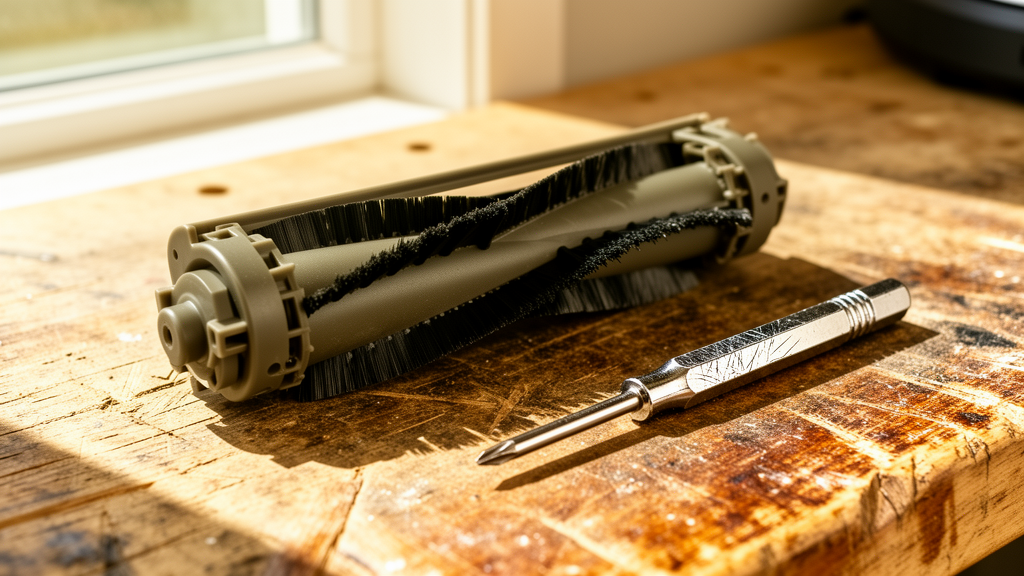
Most users perform a surface clean. You need to go deeper. Remove the brush roll cover and pull the brush roll out entirely. Inspect the ends of the brush roll—the “caps.” Hair loves to hide inside the bearing housing. Use a seam ripper or a sharp utility knife to cut through the hair wrapped around the axle. If you cannot spin the axle freely with your fingers after cleaning, the bearing is seized.
Technician’s Pro-Tip: Use a small amount of silicone-based lubricant on the brush roll end caps if they feel gritty. Do not use WD-40, as it attracts dust and will cause the bearing to seize again within weeks.
2. Inspecting the Drive Assembly
If the brush roll is clean but still won’t spin, you need to inspect the drive gear. With the brush roll removed, look into the cavity where the motor connects. Use a flashlight. Is there debris inside the gear teeth? Use compressed air to blow out any compacted dust. If the gear teeth are stripped or missing, the motor will spin, but the brush will remain stationary.
3. Testing the Motor and Sensor
If the gears are clean and the brush spins freely by hand, the issue is likely electrical. Perform a hard reset by removing the battery for 10 minutes. This clears the temporary memory of the motor controller. Reinstall the battery and initiate a “Spot Clean” cycle. Watch the brush roll closely. If it twitches but doesn’t rotate, the motor is likely failing to draw enough current, or the hall-effect sensor is reporting a false jam.
4. Battery Voltage Check
Robot vacuums are sensitive to voltage drops. According to industry standards for lithium-ion maintenance, batteries lose capacity over time. If your battery is more than three years old, it may not be providing the necessary “burst” current required to start the brush motor under load. If the vacuum runs for less than 30 minutes before returning to the dock, the battery is likely the root cause of your brush roll issues.
| Symptom | Likely Cause | Repair Difficulty |
|---|---|---|
| Brush roll makes grinding noise | Hair in bearings/seized bearing | Easy |
| Brush roll doesn’t move at all | Motor failure or belt snap | Moderate |
| “Brushroll Error” in App | Sensor obstruction or electrical fault | Moderate |
| Vacuum stops after 2 seconds | Battery voltage sag | Easy (Battery Swap) |
Recommended Video Fix
Frequently Asked Questions
Why does my Shark vacuum say “Brushroll Error” even after I cleaned it?
The error is often cached in the vacuum’s firmware. After cleaning the brush roll, you must perform a hard reset (power switch off, battery removal) to clear the error flag. If the error persists, the internal sensor that detects rotation is likely covered in dust or has failed.
Can I replace the brush motor myself?
Yes, if you are comfortable with a screwdriver. Most Shark models require removing the bottom casing to access the motor assembly. You can find replacement motors online, but ensure you match the specific model number of your vacuum, as Shark uses different motor specs across their product lines.
How often should I perform deep maintenance on the brush roll?
If you have pets or long hair in the home, you should perform a deep clean of the brush roll every two weeks. If you have a clean home with hard floors, once a month is sufficient. Regular maintenance prevents the motor from overheating, which is the primary cause of premature failure.
Final Thoughts
When you find your Shark robot vacuum brush not spinning, don’t panic and don’t rush to buy a new unit. By systematically checking for physical obstructions, verifying the integrity of the drive gears, and ensuring your battery is healthy, you can resolve the vast majority of these failures. If you have followed these steps and the brush still refuses to rotate, you are likely looking at a motor replacement. Keep your sensors clean, your bearings clear of hair, and your firmware updated to ensure your vacuum stays on the floor and out of the landfill.
Related Topics: Shark, Robot Vacuum, Troubleshooting